Video
Video editing for Facebook reels and ads: 6 things that make a video work
If the first three seconds do not stop the scroll, nobody watches. What matters most when editing reels and ad videos, in plain words.

To get your video seen among the thousands posted on Facebook every day, a good camera is not enough. Edit the same footage two ways and one gets a few hundred views while the other gets thousands. The difference is in the edit: where it starts, what stays and what goes, where the text sits, and what viewers are asked to do at the end.
This article covers the 6 things that matter most when editing reels and ad videos, how ad videos differ from ordinary reels, what to give your editor, and how to tell whether a video is working.
1. The first three seconds
People scroll Facebook fast and decide in the first moment whether to stop. If the first three seconds do not spark interest, nobody sees the rest, however good it is.
So show the most compelling part first:
- Result first: in a cooking video, the finished dish first, then how you made it.
- Open with a question: "Why do clothing orders arrive late before Eid?"
- Movement or surprise: a quick change, a before-and-after.
Start with a logo, the company name and a long intro, and most people leave. If you want a logo, keep it small in a corner, or put it at the end.
2. It makes sense without sound
Many people watch with the sound off: at the office, on the bus, at night. If the video makes no sense without sound, it means nothing to them.
- Caption everything that is said, in large clear letters
- Put the key points (price, offer, main benefit) on screen in bigger text
- Make sure captions do not cover faces or the product, or hide under Facebook's own buttons
3. The right frame
For reels and mobile ads, a vertical frame (9:16) fills the whole screen, so it catches the eye. A horizontal (16:9) video shows small on a phone, with black space above and below.
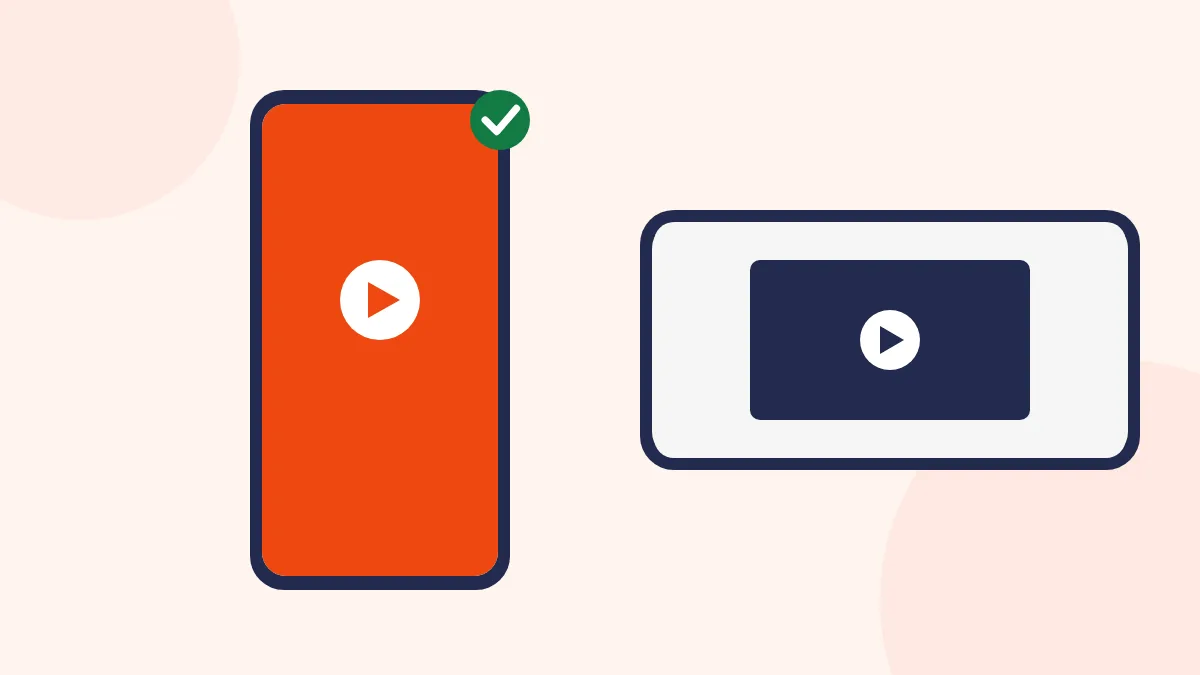
For regular YouTube videos, horizontal is right. So decide before shooting where the video will run. If you want both versions from the same footage, keep the main subject in the centre of the frame so it can be cropped to vertical later.
4. Quick cuts, but keep a story
Cut what is not needed, such as pauses, "umm"s and repeated lines, to keep the video short and tight. Shorter videos usually do better on reels.
But fast scene changes alone do not make a good video. Every video needs a clear structure:
- Start: a problem or question that sparks interest
- Middle: the solution, product or key information
- End: the result and what the viewer should do

Music is part of the structure too. Cutting to the beat makes a video feel alive. But copyrighted songs can get your video muted or your ad blocked by Facebook, so use licensed music or Facebook's own music library.
5. A clear ask at the end
Say clearly at the end what the viewer should do, and show it on screen:
- "Send us a message now"
- "Tap the link to order"
- "Follow the page for new designs every week"
Give one ask. "Follow, share, comment and order" all at once gets none of them done.
6. A consistent style
Use the same fonts, colours, caption style and the same kind of opening or ending in every video, and people recognise yours while scrolling, before they see the name. Over time this builds your brand.
Keep a short style guide: which fonts, which colours, where captions sit, where the logo goes and how big. Even if your editor changes, your videos keep the same look.
Ad videos and ordinary reels
- Reels (organic): the goal is to hold viewers and get shares. Entertainment, teaching and behind-the-scenes stories do well. Less direct selling.
- Ad videos: the goal is a specific action, such as a message or an order. Show the product and offer quickly, with a clear ask at the end.
A good trick: take a reel that did well on its own, change it slightly (add the offer and an ask at the end) and run it as an ad. A video people already liked has a better chance of working as an ad.
What to give your editor
Good editing needs good raw material and clear direction:
- All footage: in good quality, as separate files. Sending over WhatsApp lowers the quality, so share the original files by Google Drive or similar.
- Your logo, brand colours and fonts
- The goal of the video: sales, awareness or teaching
- The key message: the three things you want viewers to remember
- Links to one or two videos you like: to show the style you want
- Where it will run: reels, feed ads, stories, YouTube
- The deadline: when you need it, and how many rounds of changes
How to tell whether a video is working
View counts alone can mislead. In Facebook's insights, look at:
- How many got past the first three seconds: if few, change the opening.
- Average watch time: if many drop off midway, shorten that part.
- How many watched to the end
- For ads: how many messages or orders came in, and what each one cost.
Make two or three versions of the same product video with different openings and test which does better. Then build your next videos like the winner.
For reels, ad videos and YouTube content editing, see our video editing service page. If you need animation to explain something complex, see our animation service.
Read next

Guide
Facebook marketing for small businesses: a guide from setup to sales
Boosts bring likes but no orders? Getting the page ready, boosts versus Ads Manager, budgets and measuring results, step by step.

Software
School management software: what it does and what to check before buying
Admissions, fees, attendance, results and SMS to parents in one place. Which features each school needs, 7 checks before buying, and how to roll it out.